Convert JPG PNG to WebP Free Online — No Signup, Instant Results
What Are JPG, PNG, and WebP? (Simple Explanation)
Before converting anything, it helps to understand the differences between these three image formats. JPG is best for photos. PNG supports transparency. WebP is Google's modern format that beats both — smaller file size AND transparency support, making it the best choice for all websites in 2026.
What is JPG?
JPG (also called JPEG) is the world's most used image format, designed for photographs. It uses lossy compression — it reduces file size by permanently removing some image data. The quality loss is usually invisible, but the file is smaller.
- Best for: Photographs, product images, social media photos
- Transparency: Not supported
- File size: Medium
What is PNG?
PNG uses lossless compression — no data is lost. It supports transparent backgrounds (alpha channel), making it perfect for logos, icons, and graphics with text. The trade-off is larger file sizes.
- Best for: Logos, icons, screenshots, transparent backgrounds
- Transparency: Yes
- File size: Large
What is WebP?
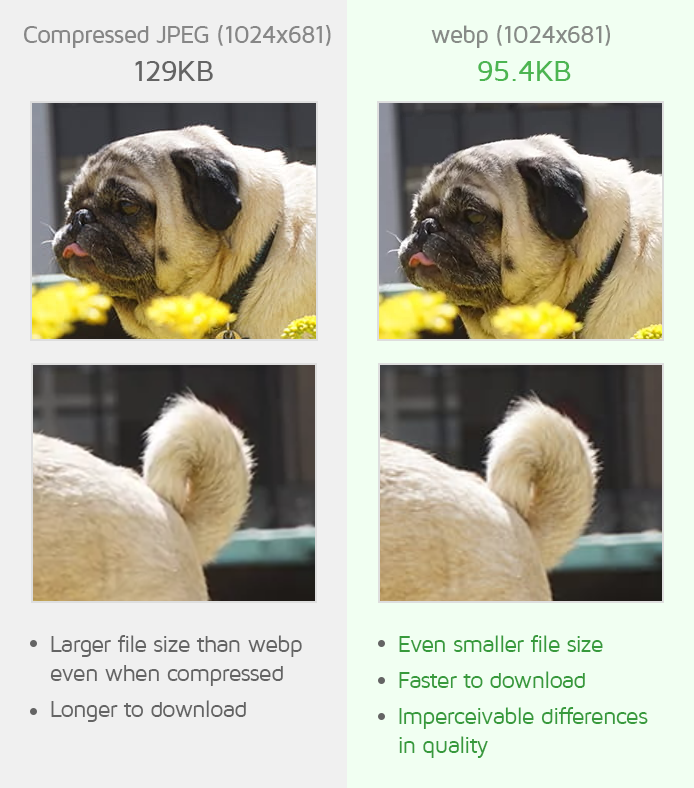
WebP is a modern image format developed by Google specifically for the web. It supports both lossy and lossless compression, supports transparency, and produces significantly smaller file sizes. According to Google, WebP lossless images are 26% smaller than PNGs, and WebP lossy images are 25–34% smaller than comparable JPGs.
- Best for: All website images — photos, logos, icons, everything
- Transparency: Yes
- File size: Smallest of the three
- Browser support: All modern browsers (Chrome, Firefox, Safari, Edge)
JPG vs PNG vs WebP: Full Comparison Table
| Feature | JPG | PNG | WebP |
|---|---|---|---|
| Compression | Lossy only | Lossless only | Both lossy & lossless |
| Transparency | ❌ No | ✅ Yes | ✅ Yes |
| File size | Medium | Large | Smallest |
| Best for web speed | ❌ No | ❌ No | ✅ Yes |
| Google PageSpeed recommended | ❌ No | ❌ No | ✅ Yes |
| All browser support (2026) | ✅ Yes | ✅ Yes | ✅ Yes |
Why Should You Convert JPG and PNG to WebP?
1. Faster website loading speed
WebP images are significantly smaller than JPG and PNG. A page with 10 PNG images totaling 2MB can serve the same images in WebP at under 500KB — making your pages load up to 4x faster.
2. Better Google Search rankings
Google uses page speed as a direct ranking factor. Converting your images to WebP improves Core Web Vitals scores, and Google rewards you with higher search rankings. This is a documented, confirmed ranking signal.
3. Lower hosting bandwidth costs
Every MB your visitors download costs bandwidth. Smaller WebP files mean less bandwidth consumed — directly reducing your hosting costs at scale.
4. Better mobile experience
Mobile users on slower connections benefit massively from WebP. Pages loading in 2 seconds instead of 8 seconds have dramatically lower bounce rates and higher engagement.
5. Future-proof format
WebP is now supported by all major browsers including Chrome, Firefox, Safari (since 2020), and Edge. As of 2026, there is no practical reason not to use WebP for all web images.
How to Convert JPG / PNG to WebP Free Online (Step by Step)
Converting your images to WebP takes less than 30 seconds using the free LynxAI Pro converter:
- Step 1: Go to lynxaipro.com/free-png-to-webp-converter
- Step 2: Upload your JPG or PNG file (drag and drop or click to upload)
- Step 3: Click the Convert button — processing is instant
- Step 4: Click Download to save your WebP file — file is auto-deleted from server
No account needed. Works on mobile, tablet, and desktop. Try the free JPG PNG to WebP converter now →
Does Converting PNG to WebP Lose Quality?
No — not when using lossless WebP conversion. Lossless WebP maintains 100% of the original image data while reducing file size by 26% or more. The converted image looks completely identical to the original PNG.
For photos (JPG to WebP), you choose the compression level. At high quality settings, the difference is invisible to the human eye while still saving 25–35% file size.
Does WebP Support Transparent Backgrounds Like PNG?
Yes — WebP fully supports alpha channel transparency, just like PNG. When you convert a PNG with a transparent background to WebP, the transparency is perfectly preserved. Your logo or icon with a removed background will look exactly the same in WebP as it did in PNG — only smaller.
How Much File Size Do You Save by Converting to WebP?
| Image Type | Original Size | After WebP | Savings |
|---|---|---|---|
| Logo with transparency (PNG) | 120 KB | 88 KB | 27% smaller |
| Product screenshot (PNG) | 850 KB | 580 KB | 32% smaller |
| Blog hero image (JPG) | 340 KB | 210 KB | 38% smaller |
| E-commerce product photo | 1.2 MB | 720 KB | 40% smaller |
| Website banner (PNG) | 2.4 MB | 1.1 MB | 54% smaller |
Does WebP Work in All Browsers?
As of 2026, WebP is fully supported in every major browser:
- ✅ Google Chrome — Full support since 2014
- ✅ Mozilla Firefox — Full support since 2019
- ✅ Apple Safari — Full support since 2020 (iOS 14+)
- ✅ Microsoft Edge — Full support since 2020
- ✅ Samsung Internet — Full support since 2019
Frequently Asked Questions
How do I convert JPG or PNG to WebP for free?
Go to lynxaipro.com/free-png-to-webp-converter, upload your image, click Convert, and download your WebP file. Completely free, no signup required.
Is it safe to upload images to LynxAI Pro?
Yes. All files are processed on 256-bit encrypted servers and automatically deleted after conversion. LynxAI Pro never stores, sells, or shares your files.
Can I convert multiple images at once?
Yes. LynxAI Pro supports batch conversion. Upload multiple JPG or PNG files and convert them all to WebP at the same time.
Why does Google recommend WebP over JPG and PNG?
Google recommends WebP because it produces smaller file sizes — 26% smaller than PNG and 25–34% smaller than JPG. Smaller images mean faster pages, which Google rewards with higher search rankings through Core Web Vitals scoring.
When should I keep PNG instead of converting to WebP?
Keep PNG for print materials, source design files, and platforms that don't support WebP. Use WebP for all images you upload to websites, blogs, and e-commerce stores.
More Free Image Tools on LynxAI Pro
- JPG to PNG Converter — Convert JPG to PNG free online
- PNG to JPG Converter — Convert PNG to JPG instantly
- JPG to WebP Converter — Convert JPG photos to WebP
- AI Image Compressor — Compress images without quality loss
- Background Remover — Remove image background with AI
👉 Convert your JPG or PNG to WebP now — free, instant, no signup →